
Self-host OpenWorker on a server
Andrew Ng's open-source coworker agent, always on, in your browser.
Shelley handles the setup. About 15 minutes.
Prefer a terminal?
curl -fsSL https://exe-staging.dev/deploy/openworker/prompt.txt | ssh exe.dev new --prompt=/dev/stdinOpenWorker is Andrew Ng's open-source AI coworker: you describe the result you want, such as a report, a spreadsheet or a summary of your inbox, and an agent plans it, runs commands, browses, and writes the files, asking before each step that matters. It ships as a desktop app, but the agent itself is a server, and that server runs fine on Linux.
Put it on an exe.dev VM and you get OpenWorker in any browser, on a machine that stays on when your laptop sleeps:
- Private by default. The web app is behind exe.dev's login; nobody else reaches it unless you share the VM.
- No API keys. Claude and GPT come through exe.dev's LLM integration.
- A box of its own. The agent runs commands on a VM with nothing else of yours on it, with a disk that keeps its state.
- Scriptable. Call OpenWorker's API from your computer with an exe.dev VM token, or run tasks headless over SSH.
report.md.What you get#
- OpenWorker 0.3.1's agent server as a systemd service, back after a reboot
- OpenWorker's web app at https://my-openworker.exe.xyz/, behind exe.dev login
- Claude and GPT models through exe.dev's LLM integration, with no API key to paste
- A random OpenWorker token in files only their owners can read, added by nginx so you never type it
- A work folder at
~/workand a headless check that an agent answers
What's running, and where
https://my-openworker.exe.xyz/
OpenWorker's web app, behind exe.dev login
https://my-openworker.exe.xyz/v1/
OpenWorker's HTTP API, for scripts on your computer with an exe.dev VM token
ssh my-openworker.exe.xyz
your terminal, for headless runs and upkeep
Deploy with Shelley#
Click Deploy and Shelley will set up OpenWorker on a new VM, then check that it works. No config-file wrangling required.
Prefer a terminal?
curl -fsSL \
  https://exe-staging.dev/deploy/openworker/prompt.txt \
  | ssh exe.dev new --prompt=/dev/stdin
What Shelley is told
Set up OpenWorker on this VM by following the exe.dev recipe at https://exe-staging.dev/deploy/openworker.md?via=deploy from top to bottom.

The recipe's example VM name is my-openworker. This VM's name is the output of `hostname`: use it wherever the recipe writes my-openworker. Skip the step that creates the VM; you are on it.

You are done when all of these are true. Check each one yourself:
- OpenWorker 0.3.1's agent server as a systemd service, back after a reboot
- OpenWorker's web app at https://my-openworker.exe.xyz/, behind exe.dev login
- Claude and GPT models through exe.dev's LLM integration, with no API key to paste
- A random OpenWorker token in files only their owners can read, added by nginx so you never type it
- A work folder at `~/work` and a headless check that an agent answers

Run the VM-side commands in "Install by hand" only, from "Install
OpenWorker" on. Never print the OpenWorker token or the contents of
`~/.config/coworker/server.env` or `/etc/nginx/openworker-token.conf`
in your messages. Verify that `openworker --version` says 0.3.1, that
`systemctl is-active openworker nginx` says active twice, that the
health check prints `"status":"ok"`, that the proxy check prints `403`
then `200`, and that the setup check prints `OK`. Skip the sections
after "Open OpenWorker" and the FAQ. Finish by giving the owner the
URL https://<this VM's name>.exe.xyz/ and the first task from "Open
OpenWorker".

Finish with the URLs I should open.
Also at /deploy/openworker/prompt.txt. The recipe it follows is /deploy/openworker.md.
Install#
Deploy installs OpenWorker, builds its web app, runs both as services, and checks that an agent answers. To do it yourself:
Install by hand
On your computer, create a VM and connect. Pick any free name; if you already have a VM, skip the first command and use its name:
ssh exe.dev new --name=my-openworker
ssh my-openworker.exe.xyz
Install OpenWorker#
On the VM, install the openworker program, pinned to 0.3.1, the newest
release as of November 2026. It goes in ~/.local/bin, with the agent
server next to it in ~/.local/share/openworker:
curl -fsSL https://openworker.com/install.sh | OPENWORKER_VERSION=0.3.1 sh
export PATH="$HOME/.local/bin:$PATH"
openworker --version
Connect the models#
Give the server its settings in a file only you can read: a random token
that guards its API, and exe.dev's LLM integration
as its Anthropic and OpenAI endpoint. The integration needs no key; the
exe-gateway values only fill the fields the model libraries require:
mkdir -p ~/work ~/.config/coworker
install -m 600 /dev/null ~/.config/coworker/server.env
cat > ~/.config/coworker/server.env <<EOF
COWORKER_API_TOKEN=$(openssl rand -hex 32)
ANTHROPIC_BASE_URL=https://llm.int.exe.xyz
ANTHROPIC_API_KEY=exe-gateway
OPENAI_BASE_URL=https://llm.int.exe.xyz/v1
OPENAI_API_KEY=exe-gateway
EOF
Check that an agent answers, with a headless run that keeps nothing:
(set -a; . ~/.config/coworker/server.env; openworker run --isolated --out /tmp/openworker-check \
  --model anthropic/claude-haiku-4-5 --approval-mode bypass-approvals \
  --prompt "Reply with exactly: OK")
The agent's reply, OK, comes before a summary line that ends with
outcome=completed.
Run the server as a service#
Run the agent server with systemd, on 127.0.0.1:8765 where only the VM
reaches it, with ~/work as its folder:
sudo tee /etc/systemd/system/openworker.service >/dev/null <<'EOF'
[Unit]
Description=OpenWorker agent server
After=network-online.target
Wants=network-online.target

[Service]
User=exedev
WorkingDirectory=/home/exedev/work
EnvironmentFile=/home/exedev/.config/coworker/server.env
Environment=PATH=/home/exedev/.local/bin:/usr/local/bin:/usr/bin:/bin
ExecStart=/home/exedev/.local/share/openworker/openworker-server --host 127.0.0.1 --port 8765 --cwd /home/exedev/work
Restart=always
RestartSec=5

[Install]
WantedBy=multi-user.target
EOF
sudo systemctl daemon-reload
sudo systemctl enable --now openworker
sleep 5
curl -s localhost:8765/v1/health
The health check prints {"status":"ok"}.
Build the web app#
The Linux program has no interface of its own, so build the desktop app's from the same release. It needs Node.js 22, from NodeSource, and takes about a minute:
curl -fsSL https://deb.nodesource.com/setup_22.x | sudo -E bash -
sudo apt-get install -y nodejs
git clone --depth 1 --branch v0.3.1 https://github.com/andrewyng/openworker ~/openworker-src
cd ~/openworker-src/surfaces/gui
npm ci
npm run build
sudo rm -rf /var/www/openworker
sudo cp -r dist /var/www/openworker
cd ~
Serve it with nginx#
nginx serves the web app on port 8000, where exe.dev's
HTTPS proxy sends https://my-openworker.exe.xyz/, and
passes the API to the server. On the way it adds the token, so the browser
never needs it, and makes the VM's own address look local, the only kind
of page the server accepts. Pages from other sites get 403.
First the token, in a file only root can read:
token=$(sed -n 's/^COWORKER_API_TOKEN=//p' ~/.config/coworker/server.env)
sudo install -m 600 /dev/null /etc/nginx/openworker-token.conf
echo "set \$openworker_token \"$token\";" | sudo tee /etc/nginx/openworker-token.conf >/dev/null
unset token
Then the site, with your VM's address filled in:
sudo tee /etc/nginx/sites-available/openworker >/dev/null <<'EOF'
map $http_upgrade $openworker_connection {
    default upgrade;
    ""      close;
}
# The server trusts only local pages: present this VM's own address as one.
map $http_origin $openworker_origin {
    default            $http_origin;
    "https://VM_HOST"  "http://127.0.0.1";
}
# Refuse pages from any other site. Scripts send no Origin and pass.
map $http_origin $openworker_foreign {
    default            1;
    ""                 0;
    "https://VM_HOST"  0;
}

server {
    listen 8000;
    listen [::]:8000;
    root /var/www/openworker;
    client_max_body_size 50m;
    include /etc/nginx/openworker-token.conf;

    location / {
        try_files $uri /index.html;
    }

    location ~ ^/(v1|ws|auth|oauth|mcp)/ {
        if ($openworker_foreign) {
            return 403;
        }
        proxy_pass http://127.0.0.1:8765;
        proxy_http_version 1.1;
        proxy_set_header Host 127.0.0.1:8765;
        proxy_set_header Origin $openworker_origin;
        proxy_set_header Upgrade $http_upgrade;
        proxy_set_header Connection $openworker_connection;
        proxy_set_header X-OpenWorker-Token $openworker_token;
        proxy_set_header Sec-WebSocket-Protocol "openworker, $openworker_token";
        proxy_hide_header Sec-WebSocket-Protocol;
        proxy_buffering off;
        proxy_read_timeout 1h;
    }
}
EOF
sudo sed -i "s/VM_HOST/$(hostname).exe.xyz/g" /etc/nginx/sites-available/openworker
sudo ln -sf /etc/nginx/sites-available/openworker /etc/nginx/sites-enabled/openworker
sudo rm -f /etc/nginx/sites-enabled/default
sudo nginx -t
sudo systemctl enable nginx
sudo systemctl reload-or-restart nginx
Check it, as a page from another site and then from your VM's address:
curl -s -o /dev/null -w '%{http_code}\n' -H 'Origin: https://example.com' localhost:8000/v1/health
curl -s -o /dev/null -w '%{http_code}\n' -H "Origin: https://$(hostname).exe.xyz" localhost:8000/v1/sessions
The first prints 403, the second 200.
Open OpenWorker#
Open https://my-openworker.exe.xyz/ and log in to exe.dev. OpenWorker
asks What should we produce?, with work as the folder, Ask for
approval as the mode, and GPT-5.6 Sol as the model. Type a task:
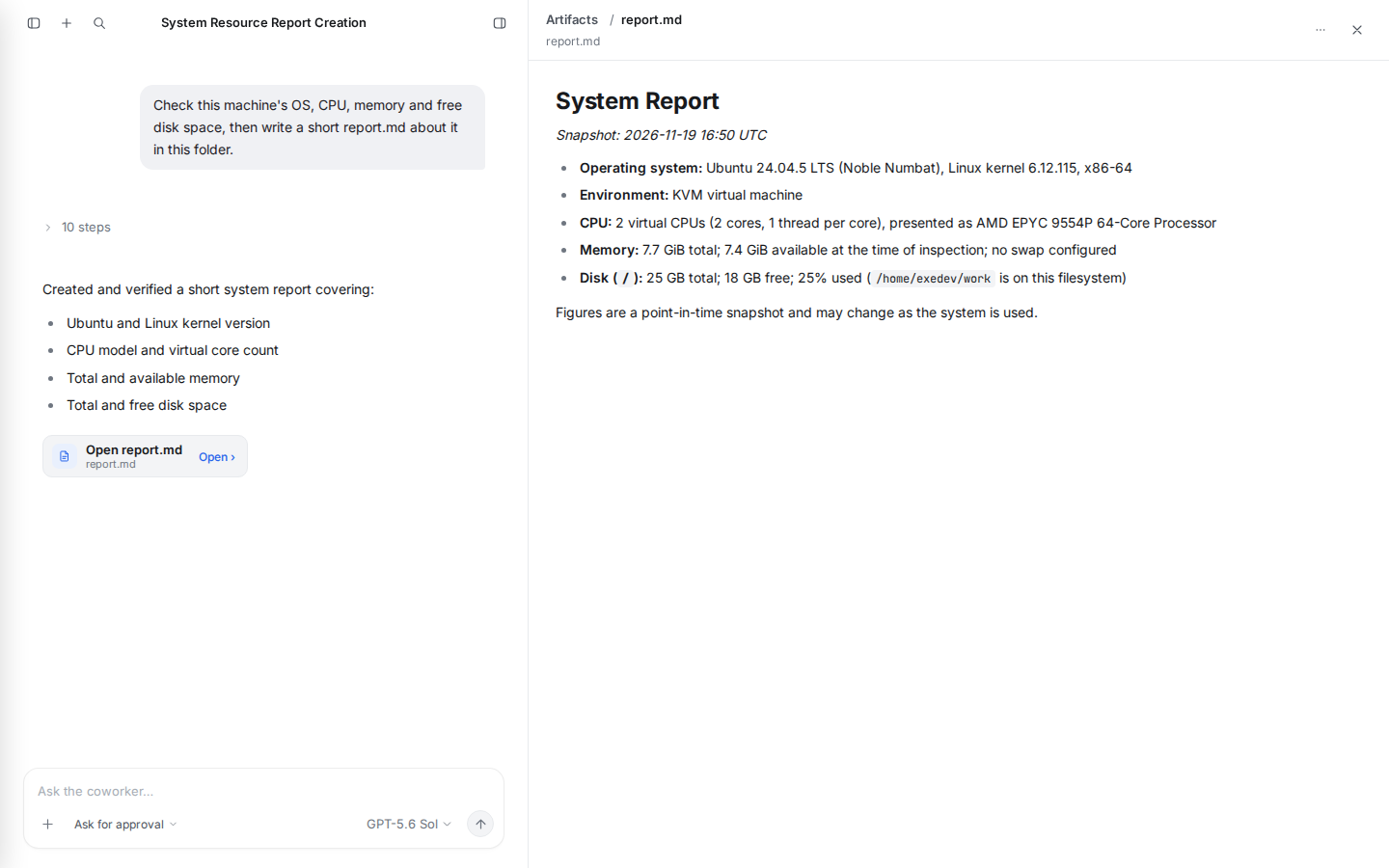
Check this machine's OS, CPU, memory and free disk space, then write a short report.md about it in this folder.
The agent plans, then stops at cards such as Run a command and Write
report.md: choose Allow once, Allow for this session, or
Deny. When it's done, open report.md in the Artifacts pane on the
right. The file is in ~/work on the VM.
A few things worth knowing:
- Pick the model at the bottom of the message box. Claude models (Fable, Opus, Sonnet, Haiku) and GPT-5.6 are listed and run through the LLM integration.
- Modes: Discuss only talks, Ask for approval asks before edits and commands, and Bypass approvals goes ahead on its own, keeping basic safety checks. Fetches from websites get their own cards, showing which site the data goes to.
- Where results go: files the agent works on are in
~/work; the documents it produces as a session's artifacts are in~/OpenWorker/<session>/. - Settings (the menu at the bottom left) has Models & Keys, Connectors, Skills, Memory and Coworkers, the same as the desktop app.
Warning
Whoever gets past exe.dev's login can make the agent run any command on the VM. Share the VM only with people you'd give a shell, and keep it private.
Connect your tools#
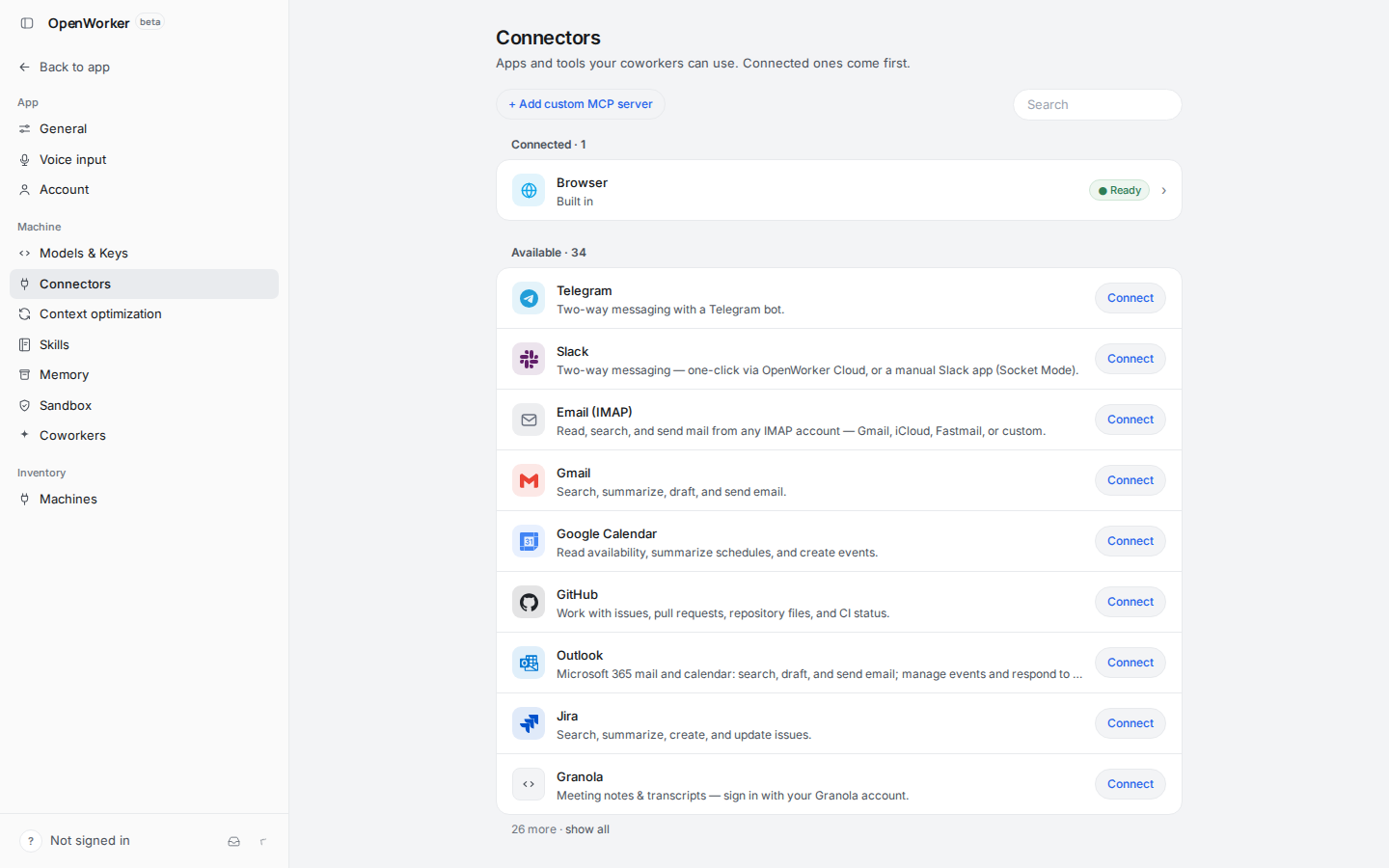
Settings → Connectors lists OpenWorker's connectors: Telegram, Slack, email over IMAP, Gmail, Google Calendar, GitHub, Outlook, Jira and two dozen more, plus Add custom MCP server for any hosted MCP server.
Connectors that take a token or password, such as IMAP, Telegram or a
manual Slack app, keep it in ~/.config/coworker on the VM. The one-click
ones sign in through OpenWorker Cloud, an account this page doesn't use.
To keep a credential off the VM altogether, let exe.dev hold it:
- GitHub: connect a repository. The agent
can then clone it from
https://github.int.exe.xyz/OWNER/REPO.git, and useghwithGH_HOST=github.int.exe.xyz, with no token on the VM. - Any HTTP API: an HTTP proxy integration
adds the key on exe.dev's side, and the VM calls
https://NAME.int.exe.xyz/instead. That works for a hosted MCP server that takes a bearer token: add the integration's URL under Add custom MCP server.
Keep secrets out of chat messages; the agent secrets page has more patterns.
Call it from your computer#
The API is behind exe.dev's login too. For scripts, make a token for this VM on your computer (HTTPS tokens for VMs):
ssh exe.dev ssh-key generate-api-key --vm=my-openworker --label=openworker
Send it in the X-Exedev-Authorization header. nginx adds OpenWorker's
own token, so this lists your sessions:
TOKEN=exe0.paste-your-token
curl -s -H "X-Exedev-Authorization: Bearer $TOKEN" https://my-openworker.exe.xyz/v1/sessions
and this reads a session's artifacts, with an id from that list:
curl -s -H "X-Exedev-Authorization: Bearer $TOKEN" \
  https://my-openworker.exe.xyz/v1/sessions/SESSION_ID/artifacts
To run a task without the browser, use OpenWorker's headless mode over SSH:
ssh my-openworker.exe.xyz 'set -a; . ~/.config/coworker/server.env; cd ~/work; \
  ~/.local/bin/openworker run --model anthropic/claude-haiku-4-5 --approval-mode bypass-approvals \
  --prompt "Count the words in report.md and reply with just the number."'
It prints the agent's steps and answer, then a summary line with the outcome and cost.
Back up and restore#
For a copy of the whole VM, run this on your computer (choose a free backup name):
ssh exe.dev cp my-openworker my-openworker-backup
OpenWorker keeps its sessions, settings, connector credentials and
token in ~/.config/coworker, and session artifacts in ~/OpenWorker.
To archive them and your work folder on the VM, stop the server for a
moment. The archive holds secrets, so keep it private:
mkdir -p ~/backups
sudo systemctl stop openworker
tar -C ~ -czf ~/backups/openworker-$(date +%F).tar.gz .config/coworker OpenWorker work
sudo systemctl start openworker
chmod 600 ~/backups/openworker-*.tar.gz
To restore one on a VM set up as above, replace 2026-11-19 with the
archive's date, then write the nginx token file again from "Serve it with
nginx" and reload nginx:
sudo systemctl stop openworker
rm -rf ~/.config/coworker ~/OpenWorker
tar -C ~ -xzf ~/backups/openworker-2026-11-19.tar.gz
sudo systemctl start openworker
Update#
OpenWorker's releases page lists new versions. To move to one, set its number in both places, reinstall the program, rebuild the web app from the matching tag, and restart; running sessions are interrupted, so pick a quiet moment:
v=0.3.1
curl -fsSL https://openworker.com/install.sh | OPENWORKER_VERSION=$v sh
rm -rf ~/openworker-src
git clone --depth 1 --branch v$v https://github.com/andrewyng/openworker ~/openworker-src
(cd ~/openworker-src/surfaces/gui && npm ci && npm run build)
sudo rm -rf /var/www/openworker
sudo cp -r ~/openworker-src/surfaces/gui/dist /var/www/openworker
sudo systemctl restart openworker
openworker --version
Keep the program and the web app on the same version.
Troubleshooting#
- The page is blank or says it can't reach the server. On the VM,
systemctl status openworkerandcurl -s localhost:8765/v1/health;journalctl -u openworker -n 50shows why it stopped. Thensudo nginx -tandsystemctl status nginx. - Every request gets
403. The address in/etc/nginx/sites-available/openworkermust match the one in your browser,https://my-openworker.exe.xyz. If you renamed the VM, run thesedline from "Serve it with nginx" on a fresh copy of the file. - Requests fail after you changed the token. The token in
~/.config/coworker/server.envand/etc/nginx/openworker-token.confmust match: write the nginx file again, thensudo systemctl restart openworkerandsudo systemctl reload nginx. - A task stops with "LLM credits exhausted". Your exe.dev LLM credit ran out for now; it refreshes over time. Choose Retry later.
- The model picker has no Claude or GPT models. The server reads the
integration settings from
~/.config/coworker/server.envonly when it starts: check the file, thensudo systemctl restart openworker.
Frequently asked questions#
Is there an official OpenWorker server or Docker image?
Not for the desktop app. OpenWorker ships as a macOS and Windows app whose interface talks to a local agent server, plus a Linux openworker program for headless runs and remote machines. The Linux program includes the same server, so this page runs it as a service and serves the app's interface from its source. The VM is the box around it: no Docker needed. (OpenWorker's optional OpenShell sandbox uses Docker for its own per-agent containers; it isn't covered here.)
Do I need an OpenAI or Anthropic API key?
No. The server reaches Claude and GPT through exe.dev's LLM integration, and usage is billed to your exe.dev account; see the models and prices. To use your own keys or another provider instead, add them under Settings → Models & Keys.
Who can use it?
Only you, by default: the web app and API sit behind exe.dev's login. Everyone who gets past it can make the agent run commands on the VM, so share the VM only with people you'd give a shell, and never make it public.
Does it keep working when I close the browser?
Yes. Sessions run in the server on the VM, so you can close the tab mid-task and come back to the result. Automations run on their schedule while you're away.
Can I use Ollama or another local model?
OpenWorker supports Ollama and other OpenAI-compatible servers, but exe.dev VMs have no GPU, so a local model runs on the CPU: fine for a small model and a little patience, slow for real agent work. The LLM integration is the practical choice here.
How is this different from the desktop app?
It's the same interface and agent, on a machine that's always on and reachable from any browser. What needs your own computer doesn't apply: there's no native folder picker (the agent works in ~/work and the folders you name in a message), and connectors that sign in through OpenWorker Cloud may not complete their sign-in here.
Something's not working. Where do I look?
On the VM, systemctl status openworker nginx and journalctl -u openworker -n 50. Troubleshooting covers the usual problems.
Updated Nov 19, 2026 · tested end to end Nov 19, 2026 · Markdown · manifest.json · Something wrong? Tell us